



Website Speed Optimization, when we think of it. What first comes to mind? Some complex programming? Well, in this blog we are going to show you that it is not so complex.
A slow website is more than just annoying, it’s bad for business. If your site takes too long to load, people leave. It doesn’t matter how great your product is or how beautiful your design looks. Speed is a part of your first impression.
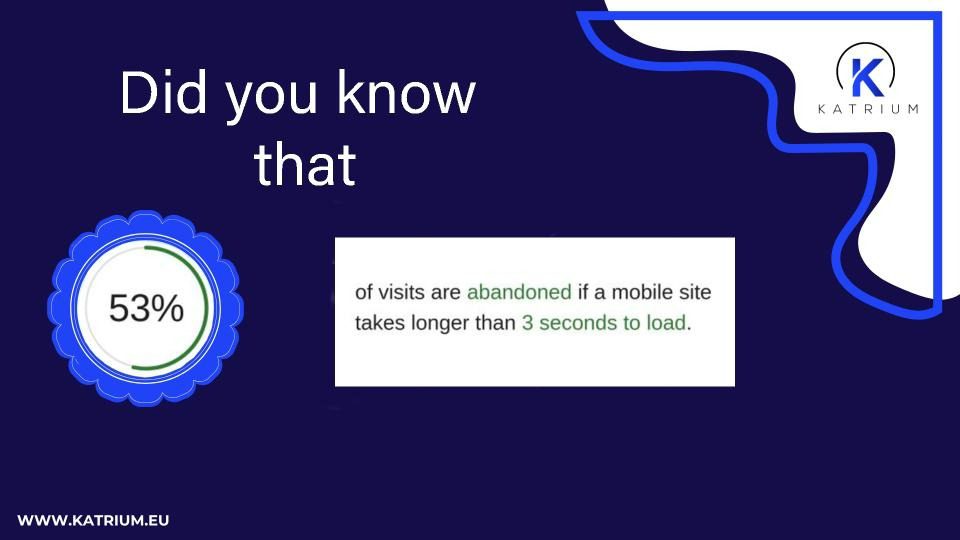
According to Google, 53% of mobile users leave a page that takes more than 3 seconds to load. That means even a small delay can cost you leads, sales, and trust.
The good news? Speed problems are usually fixable. In this blog, we’ll walk through simple steps you can take to make your website faster, without being a developer. And if you’re using WordPress, you already have a strong base. Katrium works with both WordPress and custom-built websites, helping clients achieve faster load times without technical hassle. Check out our full list of services to see how we can help your business grow.

1. Compress and Resize Your Images
Large image files are one of the most common reasons websites slow down. That’s why optimizing image size is the necessary step in website speed optimization.
Let’s say you upload a photo straight from your phone or camera. It might be 4–6 MB in size. Multiply that by 10 images on a page, and you’re looking at serious lag and loading time. But your users don’t need that full resolution.
Instead, you can:
- Resize images to the exact size you need on your site
- Use a compressed format like WebP instead of JPEG or PNG
- Run images through a free tool like TinyPNG to shrink their file size without losing quality
If you’re using WordPress, there are also plugins like Smush or ShortPixel that automatically optimize images as you upload them.
2. Remove Unnecessary Links and Plugins
Links that lead nowhere, outdated redirect chains, and plugins you don’t use anymore all slow your site.
Every link you include, especially if it connects to third-party scripts, adds a little more loading time for your browser. This includes:
- Embedded social media feeds
- Old analytics tools
- Chat widgets
- Forms or pop-ups
Ask yourself: Do I really need this? If not, remove it. Clean code = faster performance. Cleaning up unused links and plugins is one of the easiest wins in website speed optimization.
At Katrium, we often audit websites for clients and find outdated tools quietly slowing them down—something that’s easily fixed with the right support.
3. Watch Out for Large Files
Some websites try to load everything at once: videos, pop-ups, product catalogs, downloadable PDFs, and more.
While these features may look great, they often come with large JavaScript or CSS files that take time to load. A few tips:
- Don’t autoplay videos in the background unless necessary
- Host large files (like PDFs) externally if possible
- Use lazy loading for images or sections that aren’t immediately visible
To test your current speed and find heavy elements, try GTmetrix or Google PageSpeed Insights or explore how data and SEO insights can guide long-term improvements. Managing file size is an important part of website speed optimization, especially when you want faster load times on mobile devices or desktop machines. These tools give you a report on what’s slowing you down, and how to fix it.
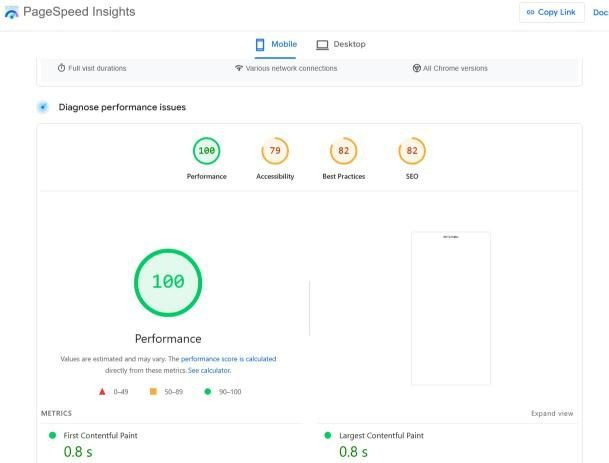
For example, we tested the mobile speed of IMDb using PageSpeed Insights. The site scored 100 for performance, meaning it loads very quickly, with key speed metrics like First Contentful Paint and Largest Contentful Paint both at just 0.8 seconds. This shows how a well-optimized website performs under Google’s standards.
4. Choose The Right Hosting Plan In Website Speed Optimization
If your hosting is slow, your website speed optimization will be influenced and your site will also be slow too. No matter how well you optimize it.
Many small businesses start with shared hosting, which is fine in the beginning. But as traffic grows, that same cheap plan can act as a speed barrier. A good host should offer:
- Fast servers with solid uptime
- Servers close to your country or city
- Caching options
- CDN (content delivery network) support
Even switching from one shared host to a better one can reduce load times by up to 50%. While hosting matters, real results come from the way your site is managed. That’s why many businesses work with Katrium to improve performance, structure, and user experience.
5. Keep the Backend Clean (Without Overcomplicating It)
The structure and coding of your website’s backend influences its speed and performance.
Now, this can get very technical. The language your site is written in (like PHP, Python, or JavaScript) and the framework it uses (like Laravel or React) all play a role. Some setups are faster than others.
But for most people, especially small businesses, the backend doesn’t need to be complex.
Platforms like WordPress offer everything you need. They’re fast, flexible, and easy to optimize, especially when combined with outsourcing support to keep your site well maintained.. Just avoid using too many plugins or outdated themes. Even with WordPress, smart backend setup supports long-term website speed optimization.
For more advanced users, things like code minification, GZIP compression, or using a headless CMS may help. But that’s a topic for another day.
6. Cache Everything You Can With Website Speed Optimization
Caching helps your site load faster by storing parts of it so they don’t reload every time.
There are several kinds of caching:
- Browser caching saves elements locally
- Server-side caching helps repeated requests load faster
- CDNs like Cloudflare distribute your site across multiple locations for global speed
Caching is one of the most effective tools in website speed optimization, especially when combined with a clean backend and fast hosting. If you’re on WordPress, plugins like WP Rocket or W3 Total Cache make this simple to set up.
Final Thoughts: Website Speed Optimization Is a Part of a Good Business
Your website is often the first place people meet your brand. A slow site doesn’t just frustrate, it makes you look unprofessional.
Website speed optimization isn’t just about tech, it’s about trust, user experience, and growth. With just a few changes, you can:
- Keep people on your site longer
- Improve your Google ranking
- Boost your conversion rates
At Katrium, we help businesses grow through smart strategies, and that includes improving digital performance. If your site is slow, cluttered, or hard to manage, contact Katrium and we’ll help you make it clean, fast, and ready to scale.
Want to know how fast your site really is? Try this free test: Google PageSpeed Insights
Need support with website speed optimization or multilingual performance? Reach out to us, we are ready to help you grow smarter.